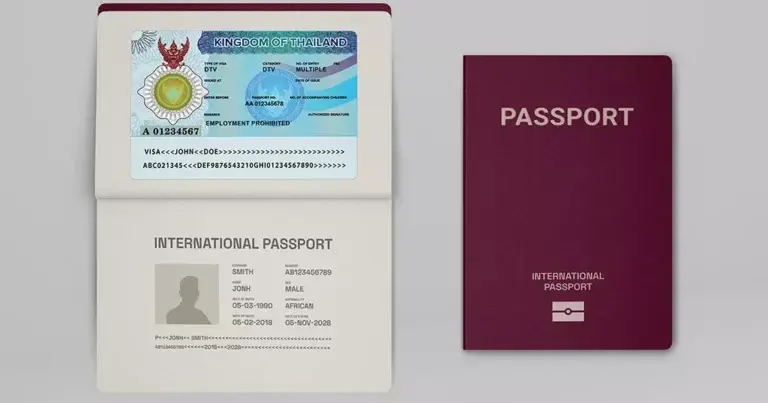
The Destination Thailand Visa (DTV) is a special tourist visa for people who want to stay in Thailand for an extended period and work remotely or participate in approved activities. It is frequently used by remote workers, freelancers, and frequent travelers who want to stay in the country flexibly and for a longer time.
The visa is valid for 5 years and allows multiple entries. Each entry permits a stay of up to 180 days. You can extend your stay once per entry for another 180 days, allowing you to stay in Thailand for a total of up to 360 consecutive days.
Note: The DTV does not entitle the holder to employment with companies registered in Thailand or to obtain a Thai work permit. It is intended for remote work with foreign employers or for operating an online business based outside of Thailand.
How do I apply for a Thailand visa for 2026?
To apply for a Thailand visa (DTV) for 2026, you must submit your application from outside Thailand. All applications are completed online through the official Thai e-Visa system, allowing you to apply online without having to visit a Thai embassy or consulate in person.
As part of your application, you must demonstrate sufficient financial resources, generally at least 500,000 THB, and submit documents confirming your purpose of stay. These include, for example, a teleworking agreement, proof of business ownership, or confirmation of participation in a recognized cultural or professional activity.
Key changes for DTV in 2026
If you are applying for a Thailand visa (Destination Thailand Visa, DTV) in 2026, the following updates and guidance may affect your application:
The DTV application process
The application process for a Thailand visa (DTV) can be completed in several steps. Please ensure that all required documents are ready before submitting your application.
Step 1: Prepare the required documents
Before submitting your application, you should have the following documents ready:
Step 2: Submit the application
You must apply from outside Thailand.
Applications are submitted through the official Thai e-Visa system, which allows online applications. The visa fee is typically 10,000 THB or the equivalent in local currency, depending on the embassy or consulate.
Step 3: Processing and Approval
Processing times may vary depending on the embassy or consulate where you submit your application. Generally, applications submitted through embassies in neighboring countries are processed more quickly than those in other regions.
During the review process, embassies may request additional documents or clarifications, which may affect the overall processing time.
After approval, you will receive your visa electronically.
Step 4: Input and expansion
Upon arrival in Thailand, you will be granted a stay of up to 180 days per entry.
If you wish to stay longer, you can apply for a one-time extension of 180 days at a Thai immigration office. The fee for the extension is 1,900 THB.
Note on compliance with regulations: Site requirements
You must be physically outside of Thailand when you submit your application for a Destination Thailand Visa (DTV).
Applications submitted while you are in Thailand or with incorrect location information may be rejected. In some cases, false or misleading information may lead to further legal consequences.
To avoid delays or complications, please ensure that your application is submitted from outside Thailand and that all information provided is accurate and consistent.
Why consult a DTV visa expert?
Applying for a Thailand visa (DTV) can involve varying requirements from embassies and changing government guidelines. Therefore, errors in the documents or incomplete submissions can lead to delays or rejection.
Seeking professional assistance can mitigate these risks. Siam Legal's immigration team regularly processes DTV applications and can review your documents, confirm they meet the current 2026 requirements, and guide you through every step of the process.
If you are planning to apply, you can contact Siam Legal for assistance in preparing and submitting your application.

Community
Comments 0
Start the conversation.