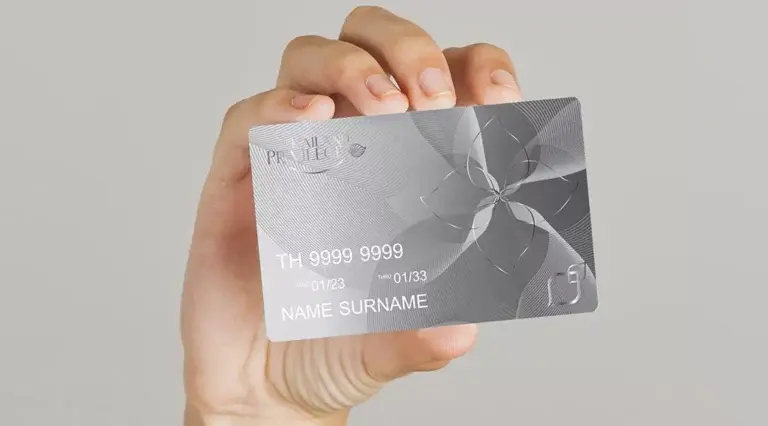
The Thailand Elite Visa offers you the most comfortable and rewarding way to live in Thailand for an extended period. With your membership in the Thailand Privilege Program, you secure the visa and gain access to luxurious benefits and complimentary VIP privileges.
As a Thailand Privilege member, you have the option to purchase a physical Thailand Privilege Card to more easily access all available benefits. These include perks such as spa packages, health checks, airport transfers, complimentary access to premium lounges, discounts at restaurants and shopping malls, and much more.
Read on to learn more about the Thailand Privilege Card, how to obtain it, and how to use it.
What is the Thailand Privilege Card?
The Thailand Privilege Card is a physical membership card that you can apply for after registering for the Thailand Privilege program and receiving your visa. However, the Thailand Privilege Card does not replace the Thailand Privilege Visa and does not entitle you to enter Thailand, as it is neither a visa nor a travel document.
This optional card serves as physical proof of your Thailand Privilege membership and Elite Visa. This greatly simplifies the use of premium benefits and privileges, as some merchants require proof of membership to grant you the corresponding advantages.
How to get a Thailand Elite Card
The first step is to become a member of Thailand Privilege. You will need to pass a background check, pay your membership fee, and have your Thailand Elite Visa stamped in your passport.
To simplify the application process, it is recommended that you first consult a General Sales and Services Agent (GSSA). A GSSA is a visa agency or law firm that works with the Thai government to assist you with Thailand Privilege applications and offers these services free of charge. This includes checking your required documents for any errors and submitting your application on your behalf.
Once your application is received, the Thai government will conduct a basic background check, which takes 4 to 6 weeks. After successful verification and payment of the membership fee, you will receive your welcome letter and membership number.
From this point on, you can apply for a Thailand Elite Card by contacting the Thailand Privilege Member Contact Center (MCC), which is available 24/7. Alternatively, you can contact your GSSA for assistance with the application.
How to use your Thailand Privilege Card
You can use your Thailand Elite Card by presenting it to the merchant offering the desired discount upon request. Once the card has been verified and your identity confirmed, you will receive access to the corresponding discount.
Not all retailers require the presentation of a physical card, but this may be necessary for certain benefits such as free rounds of golf, discounts on shopping and in restaurants, or tickets to certain events.
Under certain circumstances, you may need to contact the MCC in advance to make a reservation. Once you have booked your reservation, you can simply meet the provider in person and present your Thailand Elite Card to verify your identity.
Without the Thailand Privilege Card, you must always have your membership card readily available when you want to take advantage of a discount or benefit. The merchant will likely need to verify this card directly with Thailand Privilege, which can lead to delays and potential misunderstandings.
Free services to help you apply for a Thailand Elite Card
For the fastest and most efficient application process for your Thailand Elite Visa and Thailand Privilege Card, contact Siam Legal. As a full-service law firm and GSSA with over 20 years of experience in Thailand, our team has the necessary knowledge and expertise to obtain your visa and card as quickly and easily as possible. Thanks to our partnership with Thailand Privilege, all our Thailand Elite services are free of charge for you.
Contact Siam Legal today and enjoy a comfortable and convenient life in Thailand with easier access to exclusive benefits during your stay.
LIVE SUPPORT
CALL
CHAT
Chat with our employee




Community
Comments 0
Start the conversation.